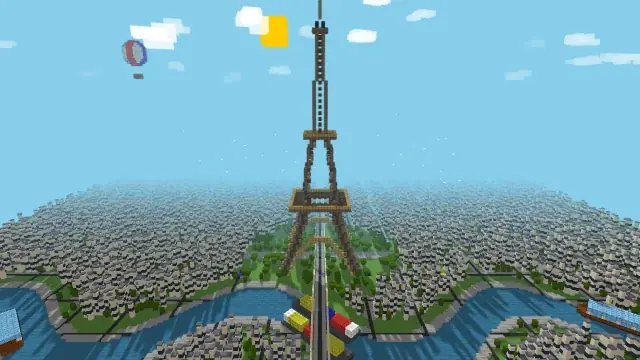
How Voxel Paris renders a city in a few hundred draw calls
Open Voxel Paris and you get a whole blocky city in the browser: an Eiffel Tower built from individual cubes, Haussmann-style blocks, a winding river with boats, roads with moving cars, trees, clouds and a hot air balloon. Every building block is a voxel, and there are thousands of them. The scene still loads fast and animates smoothly.
That is not what the naive version did. This tutorial walks through the four techniques that make it work, all taken from the effect’s own source: batching voxels by colour into THREE.InstancedMesh, merging every edge outline into a single LineSegments, sizing the shadow map to the voxel, and dismissing the loading screen only after a real frame has rendered. Each one transfers directly to your own three.js scenes.
1. The problem: one mesh per voxel
The obvious way to build a voxel scene is one THREE.Mesh per cube, plus one THREE.LineSegments child per cube for the dark edge outline that gives voxels their crisp, toy-like look. That is exactly what the first version of this effect did for the tower, the boats and the balloon.
The source says what that cost:
- Thousands of individual shadow-casting meshes.
- Roughly 20k draw calls per frame, including the shadow pass, because every mesh is drawn once for the camera and once again into the shadow map.
- A first frame that took tens of seconds on software renderers, so the page sat on the loading overlay forever and looked broken.
The lesson generalises beyond voxels: in WebGL, the number of objects you submit usually matters more than the number of triangles. A cube is 12 triangles. Twenty thousand cubes is still only 240k triangles, which any GPU can chew through, but twenty thousand separate draw calls means twenty thousand rounds of driver and state-change overhead per pass. If your scene is slow, count draw calls before you count polygons.
2. The fix: collect voxels, then flush them by colour
Voxel Paris never creates a mesh while it is designing a shape. createVoxel() just records a position and a colour into a nested map: one map per group (tower, boat, balloon), and inside it, one list per colour.
const voxelBatches = new Map(); // group -> Map(color -> [x, y, z][]) function createVoxel(x, y, z, color, group) {
if (!group) return;
let batch = voxelBatches.get(group);
if (!batch) {
batch = new Map();
voxelBatches.set(group, batch);
}
if (!batch.has(color)) batch.set(color, []);
batch.get(color).push([x, y, z]);
}The shape-building code stays simple and readable. It calls createVoxel(x, y, z, color, group) thousands of times and thinks no harder about rendering than a painter thinks about the printing press. All the optimisation lives in one place, flushVoxelGroup(group), which runs once when a group is finished.
The flush turns each colour list into a single THREE.InstancedMesh. An instanced mesh submits one geometry and one material to the GPU, plus a matrix per instance, and draws every copy in one call. Same boxes, same colours, one draw call per colour instead of one per voxel:
            batch.forEach((positions, color) => {
                const mesh = new THREE.InstancedMesh(sharedBoxGeo, getMaterial(color), positions.length);
                mesh.castShadow = true;
                mesh.receiveShadow = true;
                // Instances span the whole group; the unit-box bounding
                // sphere would wrongly cull them when the origin is off-screen
                mesh.frustumCulled = false;
                positions.forEach((pos, i) => {
                    dummy.position.set(pos[0] * voxelSize, pos[1] * voxelSize, pos[2] * voxelSize);
                    dummy.updateMatrix();
                    mesh.setMatrixAt(i, dummy.matrix);

                    for (const [a, b] of boxEdges) {
                        edgePositions.push(
                            (pos[0] + boxCorners[a][0]) * voxelSize, (pos[1] + boxCorners[a][1]) * voxelSize, (pos[2] + boxCorners[a][2]) * voxelSize,
                            (pos[0] + boxCorners[b][0]) * voxelSize, (pos[1] + boxCorners[b][1]) * voxelSize, (pos[2] + boxCorners[b][2]) * voxelSize
                        );
                    }
                });
                group.add(mesh);
            });
Three details in that block are worth stealing:
- Shared everything. The geometry and materials are created once, outside the loop, and reused by every batch. The file defines one cube geometry and one line material for the whole scene:
        const sharedBoxGeo = new THREE.BoxGeometry(voxelSize, voxelSize, voxelSize);
        const sharedEdgesGeo = new THREE.EdgesGeometry(sharedBoxGeo);
        const sharedLineMat = new THREE.LineBasicMaterial({ color: 0x000000, opacity: 0.1, transparent: true });
frustumCulled = falseis not optional. Three.js culls anInstancedMeshusing the bounding sphere of its base geometry, a single unit cube sitting at the origin. Your instances are spread across a whole city, so as soon as the origin leaves the screen, three.js would happily cull the entire city with it. The comment in the code calls this out, and the fix is one line.- A dummy
Object3Ddoes the matrix math. Set its position, callupdateMatrix(), copy the matrix into the mesh withsetMatrixAt(). It is the standard instancing idiom, and it keeps the per-instance code to three lines.
Use the same pattern anywhere you draw the same mesh many times: trees, fence posts, crowd members, debris, particles with real geometry. Group by material, collect transforms first, build one instanced mesh per group.
3. Merge every edge outline into one LineSegments
Batching the cubes only solves half the problem. The edge outlines were the other half of those 20k draw calls, because each cube carried its own LineSegments child.
The fix is to stop thinking of an outline as an object. While the flush walks each voxel’s position, it also appends that cube’s 12 edges, as raw vertex coordinates, into one big edgePositions array (you can see that loop inside the flush code above). When the group is done, the whole array becomes a single geometry and a single LineSegments:
            if (edgePositions.length > 0) {
                const edgesGeo = new THREE.BufferGeometry();
                edgesGeo.setAttribute('position', new THREE.Float32BufferAttribute(edgePositions, 3));
                group.add(new THREE.LineSegments(edgesGeo, sharedLineMat));
            }
One array, one geometry, one draw call for every outline in the group, no matter whether the group has ten voxels or ten thousand. The outlines still cast the same look, because line rendering does not care which object the vertices came from.
The general principle: any time you have many small objects made of the same primitive type and material, lines, points, or simple triangles, you can almost always merge their vertex data into one buffer and draw them together. Per-object identity is a convenience, not a requirement.
4. The city does it too, one list per material
The ground-level city in createMassiveCity() uses the same idea with a slightly different bookkeeping shape. Instead of colour keys discovered on the fly, it declares its materials up front (stone, roof, window, water, leaf, road, sidewalk, and a few more), keeps one array of matrices per material, and pushes a cloned matrix into the right array as it generates each block, building, tree and stretch of river:
            Object.keys(instances).forEach(key => {
                if (instances[key].length > 0) {
                    const mesh = new THREE.InstancedMesh(sharedBoxGeo, mats[key], instances[key].length);
                    mesh.castShadow = true;
                    mesh.receiveShadow = true;
                    for (let i = 0; i < instances[key].length; i++) {
                        mesh.setMatrixAt(i, instances[key][i]);
                    }
                    scene.add(mesh);
                }
            });
Eleven material lists means at most eleven draw calls for a city grid that spans 280 by 280 plots, buildings included. Notice the river, the roads and the bridge are not special cases. They are just voxels whose matrices landed in the water, road or stone list.
Two ways of organising the same trick, then: discover the groups while you build (the tower), or declare them up front when you already know your palette (the city). Either way, the rule is identical: the number of draw calls should scale with the number of materials, not the number of objects.
5. Size the shadow map to the voxel, not to a round number
Shadows are the hidden multiplier in this scene, because every shadow-casting mesh is rendered a second time into the shadow map. Batching already cut that cost, and then the file refuses to waste what is left. It uses a 1024 shadow map where most developers would reflexively type 2048, and the comment shows the arithmetic:
            // 1024 is plenty at this scene scale (the shadow camera spans
            // 800 units, so a texel is ~0.8 units vs the 2-unit voxel) and
            // rasterizes 4x cheaper than 2048 on software renderers
            dirLight.shadow.mapSize.width = 1024;
            dirLight.shadow.mapSize.height = 1024;
The reasoning is the part to copy. The shadow camera spans 800 world units. Spread across a 1024 map, one shadow texel covers about 0.8 units. A voxel is 2 units wide, so a texel is already smaller than the smallest feature that casts a shadow. Doubling the map to 2048 would quarter the texel size for detail nobody can see, while rasterising four times as many texels on every frame, which is exactly the kind of cost that hurts on the software renderers and low-end laptops your visitors actually use.
Before you set a shadow map size, do this division: shadow camera span divided by map size gives you texel size. Compare it with the smallest shadow-casting detail in your scene. If the texel is already smaller, a bigger map buys you nothing.
6. Dismiss the loading screen only after a real frame
The last technique has nothing to do with the GPU, and it is the one that made the original version look broken instead of just slow. A loading overlay that hides on a timer, or right after setup code runs, lies: setup finishing is not the same as anything being on screen, and with a heavy first frame the gap between the two can be seconds.
Voxel Paris hides the overlay inside animate(), immediately after the first renderer.render() returns:
            renderer.render(scene, camera);

            // Dismiss the loading overlay only once a real frame is on
            // screen, then remove it from the DOM entirely
            if (!loadingDismissed) {
                loadingDismissed = true;
                const loadingEl = document.getElementById('loading');
                if (loadingEl) {
                    loadingEl.style.opacity = '0';
                    setTimeout(() => loadingEl.remove(), 600);
                }
            }
The overlay fades, then removes itself from the DOM entirely 600ms later, so it can never intercept clicks or linger as an invisible layer. A boolean guard means the dismissal code runs exactly once.
The failure paths get the same honesty. If the three.js library fails to load, the overlay text is replaced with a plain explanation instead of spinning forever:
        // Fail gracefully if the three.js CDN script did not load
        if (typeof THREE === 'undefined') {
            document.getElementById('loading').textContent = 'Could not load the three.js library. Check your connection and reload the page.';
            throw new Error('THREE is not defined: three.js failed to load');
        }
And if WebGL itself is unavailable, renderer creation is wrapped so the same overlay explains that, and init() stops cleanly:
            try {
                renderer = new THREE.WebGLRenderer({ antialias: true, powerPreference: "high-performance" });
            } catch (e) {
                document.getElementById('loading').textContent = 'WebGL is not available in this browser, so the voxel scene cannot be displayed.';
                return;
            }
Whatever you build, give your loading state three exits: success after the first real frame, a readable message when a dependency fails, and a readable message when the platform cannot do the job at all. Never let a spinner be the only thing a failed page can show.
7. Takeaways for your own three.js scenes
- Count draw calls first. Per-object meshes with per-object children scale terribly, and shadows double the bill.
- Collect, then flush. Record positions and colours while you design; build GPU objects once, at the end, grouped by material.
- One
InstancedMeshper material turns thousands of identical objects into a handful of draw calls. Share geometry and materials across all of them. - Set
frustumCulled = falseon instanced meshes whose instances span beyond the base geometry’s bounds. - Merge line and point helpers into one buffer. Outlines, grids and guides rarely need to be separate objects.
- Do the texel maths before sizing shadow maps. Texel size equals shadow camera span divided by map size. Smaller than your smallest detail is small enough.
- Tie the loading UI to the first rendered frame, and write the failure messages before you need them.
You can remix Voxel Paris itself, and prototype your own instanced scenes, in the HTMLHub Studio. If you want the whole library ready to work from offline, the All-Access pack bundles it in one download.